
Product-level Shipping Transfers PRO
Apply a product or variation shipping rule to that line’s quantity-weighted share of WooCommerce order shipping.
Overview#
For standard WooCommerce orders, Split Pay apportions collected shipping across shippable order lines by quantity. A product or variation’s percentage or fixed shipping rule applies to that line’s share and creates a separate shipping transfer leg. To give each shipping class the shipping it was charged instead, turn on Split product shipping by shipping class.
Shipping tax is excluded from product-level shipping transfers. For a shared shipping percentage that includes the corresponding tax, use global shipping with Tax Transfer set to Partial, leaving the shipping to that global rule. This does not provide different tax-inclusive shipping rules for individual products.
Setting up product-level shipping transfers#
Go to Products in your WordPress admin and edit the product you want to configure.
Scroll down to the Product Data panel and click the Split Pay Plugin tab.
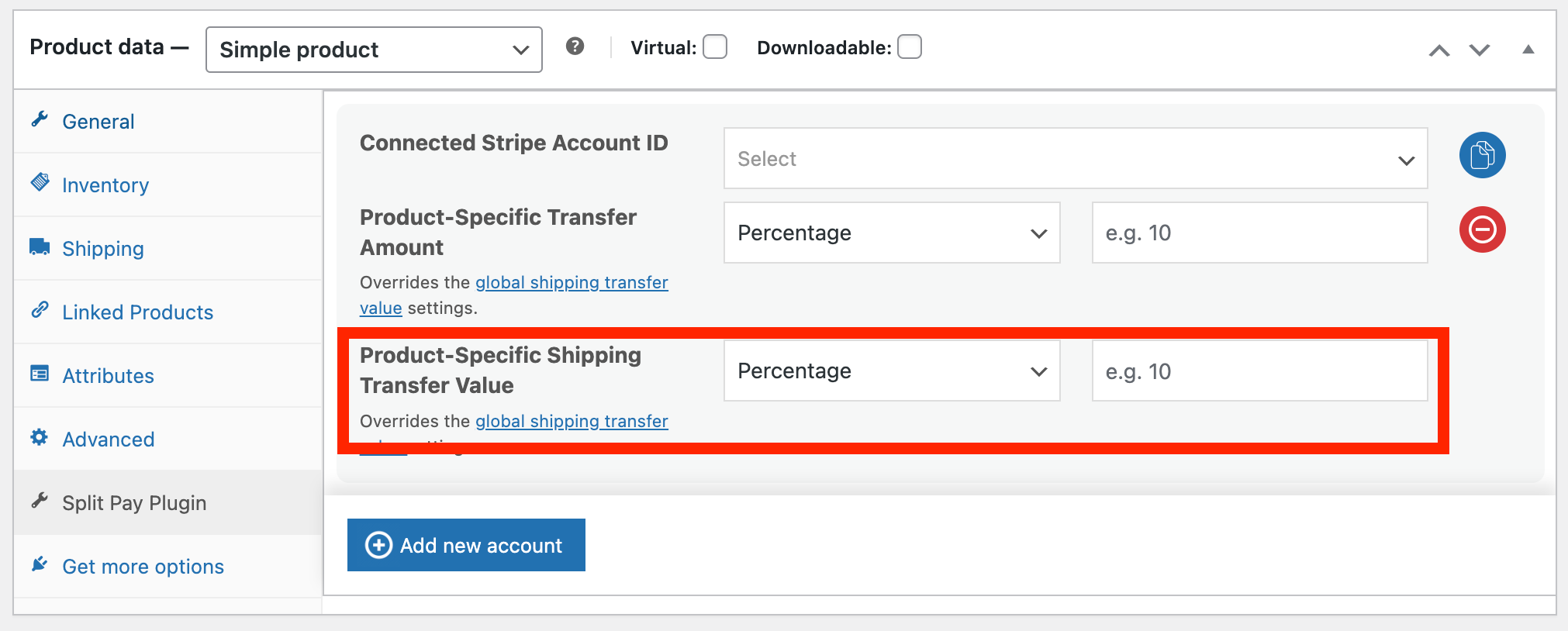
In the Shipping Transfer section, choose a transfer type:
- Percentage — A percentage of the shipping fee allocated to this product.
- Fixed Amount — A fixed amount in the order currency from the shipping fee.
Enter the shipping transfer value.
Save the product.
Variable products#
For variable products, a variation can have its own complete Split Pay recipient rule, including shipping. Navigate to the Variations tab in the product editor and expand the variation.
If the variation has no connected-account configuration, Split Pay can inherit the parent product’s complete rule. If the variation has its own recipient but leaves its shipping fields blank, Split Pay does not mix in only the parent’s shipping fields; that unallocated shipping remains available to the global shipping rule.
Parent inheritance is decided by whether the variation has its own connected-account rule, not by whether its shipping fields alone are blank.
Fallback hierarchy#
The plugin resolves a variation’s product rule first, then applies global shipping to shipping that no product rule allocated:
Split Pay does not combine a variation’s recipient fields with a parent’s shipping fields. Configure the whole variation rule when it needs its own recipient.
Example#
An order has two shippable line items with a quantity of one each and $10.00 total shipping. The T-Shirt has a 40% product-level shipping rule, and a global recipient row has a 25% shipping rule:
- Each line receives a $5.00 shipping base because their quantities are equal.
- The T-Shirt’s shipping leg is $2.00: 40% of its $5.00 share.
- That $2.00 is removed, leaving an $8.00 global shipping pool.
- The global row creates a separate $2.00 shipping leg: 25% of $8.00.
The products’ prices do not affect these shipping bases.
Split shipping by shipping class (optional)#
Use this when each shipping class is a different supplier or vendor and your Flat rate charges per class. Turn on Split product shipping by shipping class on the Advanced tab (PRO, off by default). For orders placed while it is on:
- At checkout, Split Pay records what the order’s Flat rate charged each shipping class. It records an order only when it has one Flat rate whose Calculation type is Per class, and only when those charges add up exactly to the shipping the customer paid.
- Each class’s charge goes to the products in that class, split by quantity within the class. The Flat rate’s base Cost is shared by quantity across all shippable products. Each product’s shipping rule then applies to its share.
- A shipping refund made before the order’s transfers are sent comes off the class it belongs to: the class of the refunded products or, for a shipping-only refund, the one class whose charge equals it.
Orders placed while the setting is off, orders with another shipping method or Per order calculation, and orders whose shipping or products changed after checkout keep the quantity split. Shipping refunded after the transfers are sent is still reversed in proportion across all of the order’s shipping transfers.
Example: the Flat rate charges Supplier A’s class $20 and Supplier B’s class $15. An order has two of A’s products (quantities 1 and 3) and one of B’s, so shipping is $35. Every product has a 97% shipping rule.
- Setting off: $7.00 per unit. A receives $6.79 + $20.37 = $27.16 and B receives $6.79.
- Setting on: A’s $20 is split 1:3, so A receives $4.85 + $14.55 = $19.40, and B receives $14.55.
Shipping prices changed in code#
If your theme or another plugin changes what a class pays (for example, free shipping per supplier above a minimum order), report what was charged so Split Pay follows it:
add_filter( 'spp_shipping_class_charges', function ( $charges, $order ) {
	// $charges: shipping class slug ('' = no class) => charge in cents, from your Flat rate settings.
	// Return what each class was actually charged. With the Flat rate's base cost, the charges
	// must add up to the order's shipping, or the order keeps the quantity split.
	return $charges;
}, 10, 2 );
Tip: Use the Bulk Editor to quickly update shipping transfer values across many products at once, rather than editing each product individually.