
Global Shipping Transfers PRO
Configure a store-wide shipping fee transfer rule to automatically split shipping charges with connected Stripe accounts.
Overview#
Global shipping transfers let you configure a percentage or fixed shipping rule on each store-wide recipient row.
These rules use the order’s shipping pool after any product-level shipping transfers are assigned. Shipping remains separate from product transfers.
Global shipping transfers require the PRO version. Upgrade to Pro to unlock this feature.
Configuration#
To set up global shipping transfers:
Navigate to Split Pay → Global Transfer Settings in your WordPress admin.
Locate the Shipping Transfers section.
Choose a Transfer Type:
- Percentage — Transfer a percentage of the total shipping fee (e.g., 50% of a $10 shipping charge = $5 transferred).
- Fixed Amount — Transfer a fixed amount in the order currency from the shipping fee (for example, 3.00 per order regardless of the shipping total).
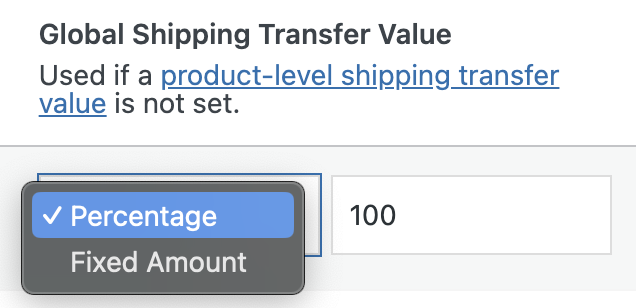
Enter the transfer value (the percentage or fixed amount).
Save your settings.
How it works#
When a customer completes checkout, the plugin handles shipping as follows:
- WooCommerce processes the payment (including the shipping fee) through Stripe.
- Split Pay calculates any product-level shipping transfers and removes those assigned amounts from the order’s shipping pool.
- Each global shipping row is calculated from the remaining pool.
- Each shipping result is sent as its own Stripe transfer leg, separate from product transfers.
The examples below assume no product-level shipping transfer has reduced the shipping pool.
Percentage example
Your store charges $12.00 for shipping and you've set a global shipping transfer of 50%:
| Item | Amount |
|---|---|
| Total shipping fee | $12.00 |
| Shipping transfer (50%) | $6.00 |
| Platform keeps | $6.00 |
Fixed amount example
Your store charges $12.00 for shipping and you've set a global shipping transfer of $4.00 fixed:
| Item | Amount |
|---|---|
| Total shipping fee | $12.00 |
| Shipping transfer (fixed) | $4.00 |
| Platform keeps | $8.00 |
How product-level rules affect the pool#
Product-level shipping transfers are calculated first. Split Pay subtracts only their actual transfer amounts; any shipping not assigned at product level stays in the global pool.
Important: A global fixed amount greater than the shipping pool still available is skipped; it is not reduced automatically.
Multi-vendor orders#
Global shipping is not divided by product price or vendor ownership. Each configured global recipient row uses the remaining order-level shipping pool; product-level rules are the product-specific shipping calculation.