
Supported Payment Methods
Split Pay can act after a supported store integration records a paid order and resolves its successful charge on your Stripe platform account.
Overview#
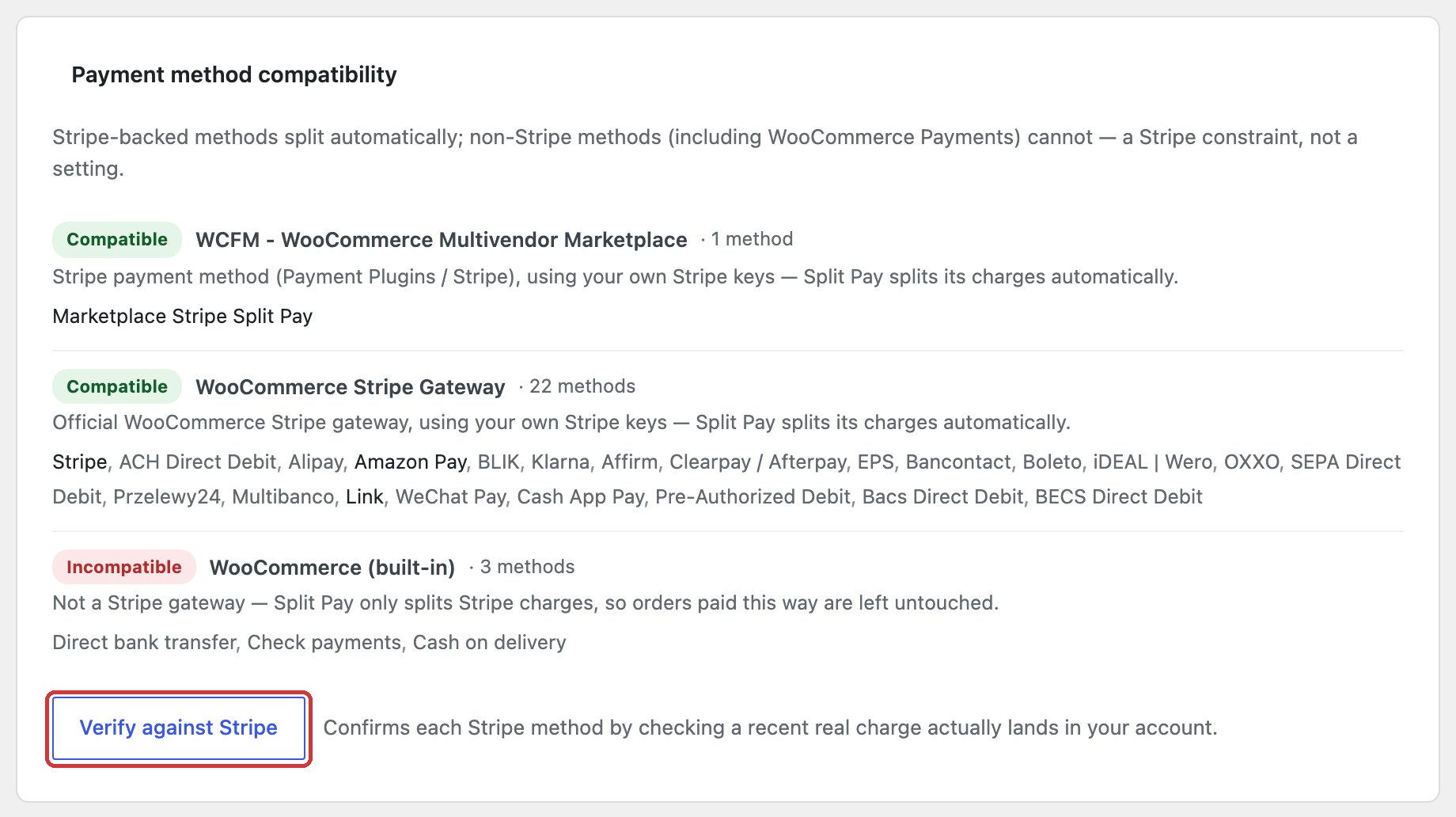
Payment-method compatibility is determined by the store integration and Stripe charge, not by a universal list inside Split Pay:
- WooCommerce: the gateway must produce a Stripe charge Split Pay can resolve on the configured platform account. The official WooCommerce Stripe gateway and Payment Plugins for Stripe WooCommerce have dedicated adapters. Another Stripe-backed gateway can use Split Pay’s universal adapter when its order exposes a resolvable charge on that same platform account. WooPayments is excluded.
- FluentCart: the paid order must use FluentCart’s built-in Stripe payment method.
- Both: Split Pay waits for a successful charge before creating transfers.
Your gateway and Stripe account decide which methods are available for your country, currency, and account. Split Pay does not enable payment methods.
Non-card payments on WooCommerce: Split Pay splits WooCommerce orders paid with iDEAL, SEPA and other non-card methods, whose Stripe charge ID starts with py_ instead of ch_. With Stripe-fee allocation PRO on, these orders stop before any transfer; see Known limitations. An order that stopped before any vendor was paid with the note Split Pay: Could not resolve charge ID for this order. can be paid with Retry Split Pay Transfers; see Orders stopped before any vendor was paid.
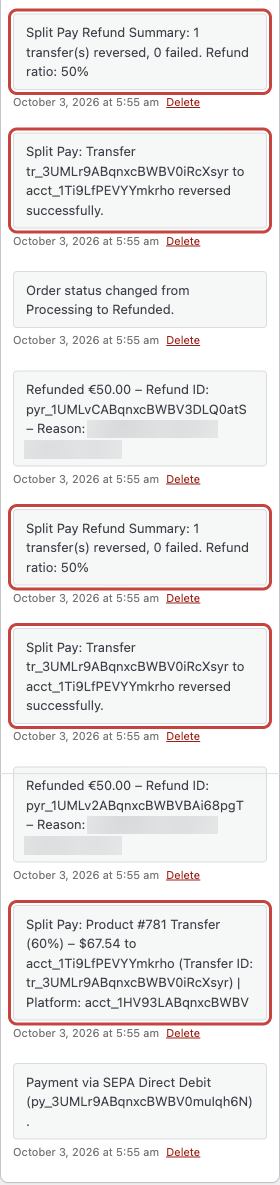
py_ charge as $67.54, and each of two €50 refunds reverses half of that transfer. Refund reasons from the test setup are blurred.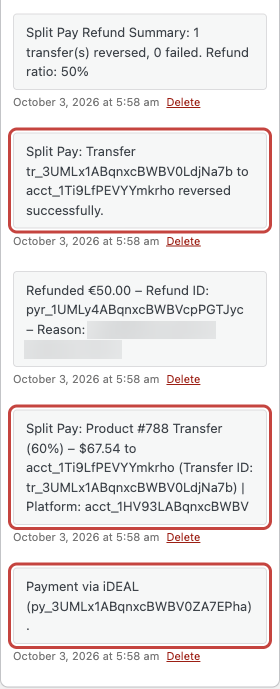
py_ charge, and a €50 refund that reverses half of it. The refund reason from the test setup is blurred.Immediately confirmed methods#
Cards and supported card-backed wallets such as Apple Pay and Google Pay commonly confirm during checkout. If the supported gateway marks the order paid and Split Pay resolves a successful platform charge, transfer processing can start from that paid-order event.
This is not a promise that every wallet or local payment method exposed by Stripe is supported by every gateway. Confirm the method in the gateway you use and complete a Test-mode order.
Delayed settlement methods#
Bank-debit and voucher methods can confirm after checkout. ACH and SEPA Direct Debit are common examples, but availability and settlement time depend on the gateway, Stripe account, country, and currency.
Split Pay does not create a transfer while the resolved charge is still pending or unsuccessful. It records that result and waits for the store integration to report the payment as successful.
How deferred transfers work#
| Store platform | What starts Split Pay | If the charge is not successful yet |
|---|---|---|
| WooCommerce | WooCommerce reports payment complete and the order has a resolvable Stripe charge. | Split Pay records the deferral and can re-check from later WooCommerce status, scheduled, or supported late-charge recovery events. A safe manual retry is also available after settlement when its requirements are met. |
| FluentCart | FluentCart reports an order paid through its Stripe method. | Split Pay’s saved per-leg plan is reconciled automatically. There is no manual FluentCart retry action. |
Enabling payment methods#
Payment methods are managed through your store gateway, not Split Pay:
Official WooCommerce Stripe Payment Gateway
Open the Stripe payment settings under WooCommerce → Settings → Payments.
Enable only methods supported by your Stripe account, country, currency, and gateway version.
Save, then place a Test-mode order and verify the platform charge and Split Pay result.
Payment Plugins for Stripe WooCommerce
Open WooCommerce → Settings → Payments and manage the Stripe methods exposed by Payment Plugins.
Save, then place a Test-mode order and verify the platform charge and Split Pay result.
See the Payment Plugins for Stripe WooCommerce integration page for the gateway-specific setup notes.
FluentCart built-in Stripe module
Open FluentCart’s built-in Stripe payment settings.
Enable the methods FluentCart and your Stripe account support, save, then verify a Test-mode paid order.
See the FluentCart integration page for the platform-specific setup notes.
You do not mirror the gateway’s method list inside Split Pay. Compatibility still depends on the platform-specific paid-order and charge requirements above.
Technical details#
For developers, the important boundaries are:
- WooCommerce enters transfer processing from
woocommerce_payment_complete, then resolves and verifies the Stripe charge. - FluentCart enters from its paid-order event and requires
payment_methodto bestripe. - A resolved charge must report
succeededbefore a transfer is sent. - Retry Failed Transfers explains WooCommerce’s manual retry and FluentCart’s automatic per-leg recovery.